Key takeaways
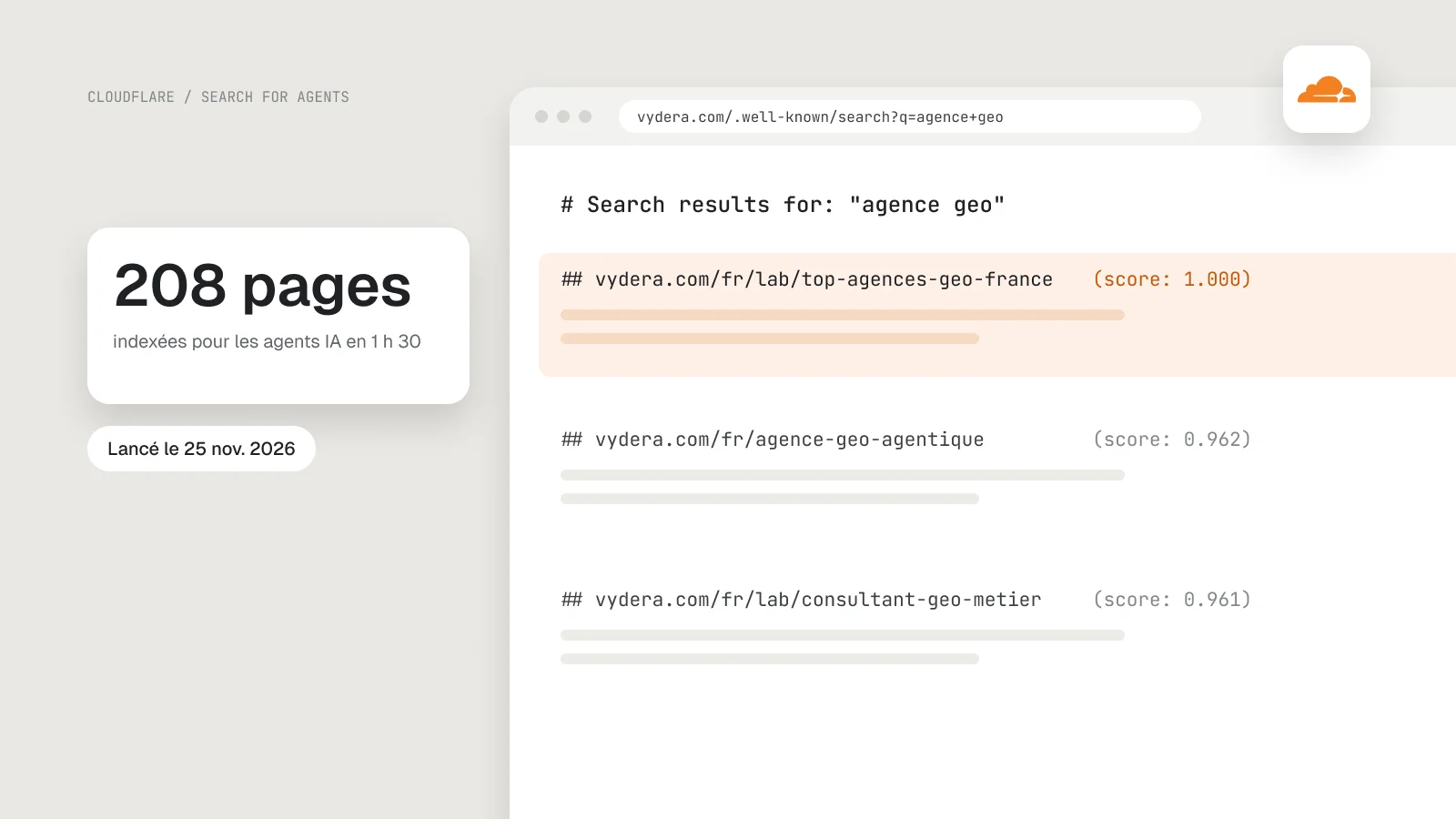
- On November 25, 2026, Cloudflare launched Search for Agents. One toggle in the dashboard, and your site opens a search engine built for AI agents, at
/.well-known/searchon your own domain. - An agent landing on your site no longer has to crawl it page by page: it asks your site a question and gets back the passages that answer it, in Markdown.
- The feature is open to every Cloudflare plan, Free included (in beta). Each month, 1,000 semantic searches and 1,000 full-text searches are included, and usage-based billing starts on December 1, 2026.
- We turned it on for vydera.com two days after launch: 208 pages indexed in about 1.5 hours, split into 1,853 chunks.
- The dashboard also shows what an assistant would answer with your site as its only source.
- The major assistants (ChatGPT, Gemini, Claude, Perplexity) have not announced using this endpoint yet. Setting it up now means being ready when they do.
Until now, an AI agent read your site like a visitor in a hurry: load a page, then another, and try to piece an answer together from whatever it found. Since November 25, with Search for Agents, your site can answer it directly.
We turned it on for vydera.com on the morning of November 27: what it sets up, what an agent receives, what it costs and what needs adjusting.
What Search for Agents does
Search for Agents gives your site a search interface built for AI, served on your own domain. The exchange happens in three steps:
- The agent lands on a page and reads, in its code, that a search engine exists and where.
- It sends its question to that engine: "what services does this agency offer?", "how long does an audit take?".
- Your site returns the most relevant passages from your pages, with their URLs. The agent writes its answer from your own words.
The agent no longer reconstructs your offer from a few pages loaded at random: it asks a question and gets your own passages back. This is the RAG principle, the method AI systems use to fetch documents before answering, except the search now runs on your side.
How Cloudflare indexes your site for agents
Search for Agents runs on AI Search, Cloudflare's indexing and search service. Until now, you had to build the index and the integration by hand. Search for Agents does it in one click, on the zone page, under Quick Actions. Cloudflare:
- creates an AI Search instance dedicated to the domain;
- crawls the site from the sitemap and links;
- splits each page into chunks of about 1,024 tokens and indexes them twice, by keywords and by meaning (hybrid search);
- opens
https://your-domain/.well-known/search?q=…; - adds four tags to the
<head>of every page to point agents to the engine.
The tags added to vydera.com, as of November 27:
The engine returns excerpts, not a written answer. Cloudflare's reasoning: the agent already has a language model, what it lacks is the right passage from your site. Excerpts come back in Markdown, the format AI reads most easily.
An agent can query the engine two ways: a regular GET request with a q parameter, or the HTTP QUERY method, standardized in June 2026 by RFC 10008, which puts the question in the request body. Calls remain subject to your firewall (WAF) rules and AI Crawl Control: you keep control over who queries your site.
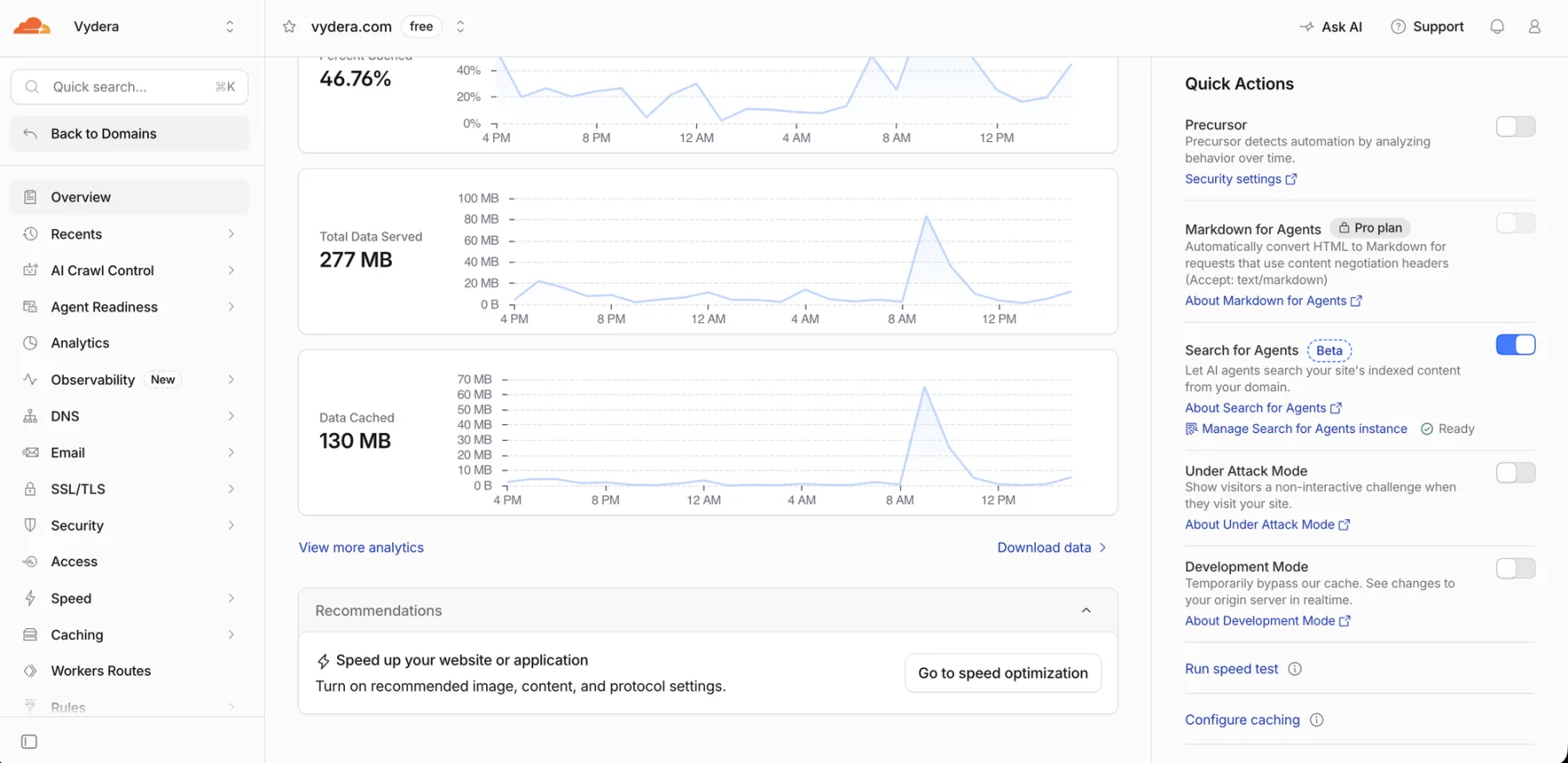
For now, /.well-known/search is a Cloudflare convention: the path is not yet in the IANA well-known URI registry (checked November 27). It can, however, be switched on for any site that runs through Cloudflare.
Our test on vydera.com
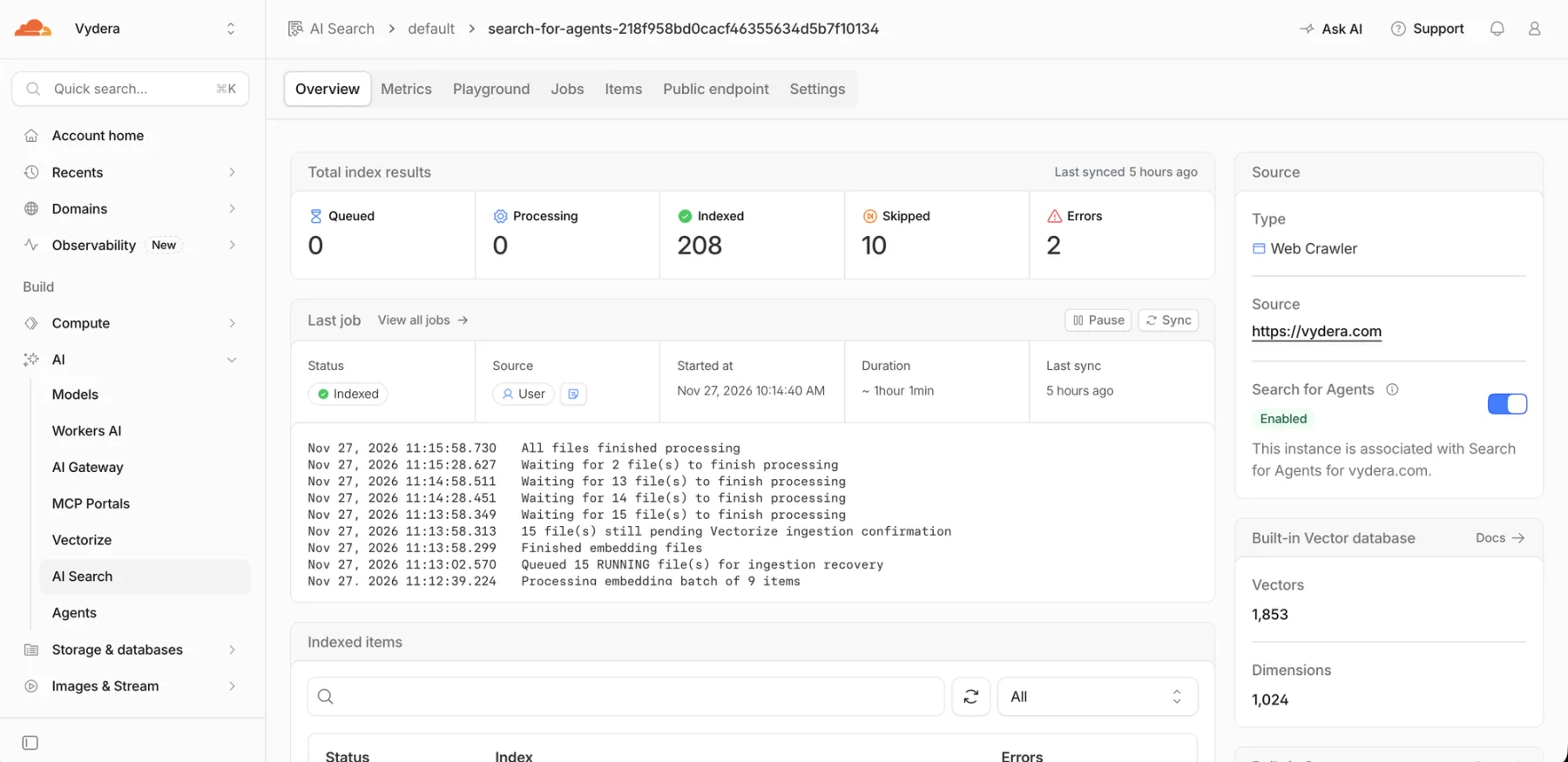
Indexing: 208 pages in 1.5 hours
The instance was created on November 27 at 9:46 a.m. (Paris time), and the index was complete around 11:15 a.m. A first crawl ran for half an hour. We then excluded a few paths of no use to an agent (thank-you page, Lab categories, API, previews), which restarted indexing for an hour.
Result: 208 pages indexed, 10 skipped, 2 errors, 1,853 chunks. During indexing, the engine returned 503 errors: wait for the first sync to finish before testing.
The response sent to an agent
We sent the engine a series of questions, in French and English. Each response contains 10 chunks, or 24,000 to 33,000 characters of Markdown, returned in 0.9 to 2.7 seconds. A real excerpt:
Each block starts with the page URL and a score, then the passage itself. The agent knows where each sentence comes from and can cite the right page.
The Playground: an AI answer with only your site as a source
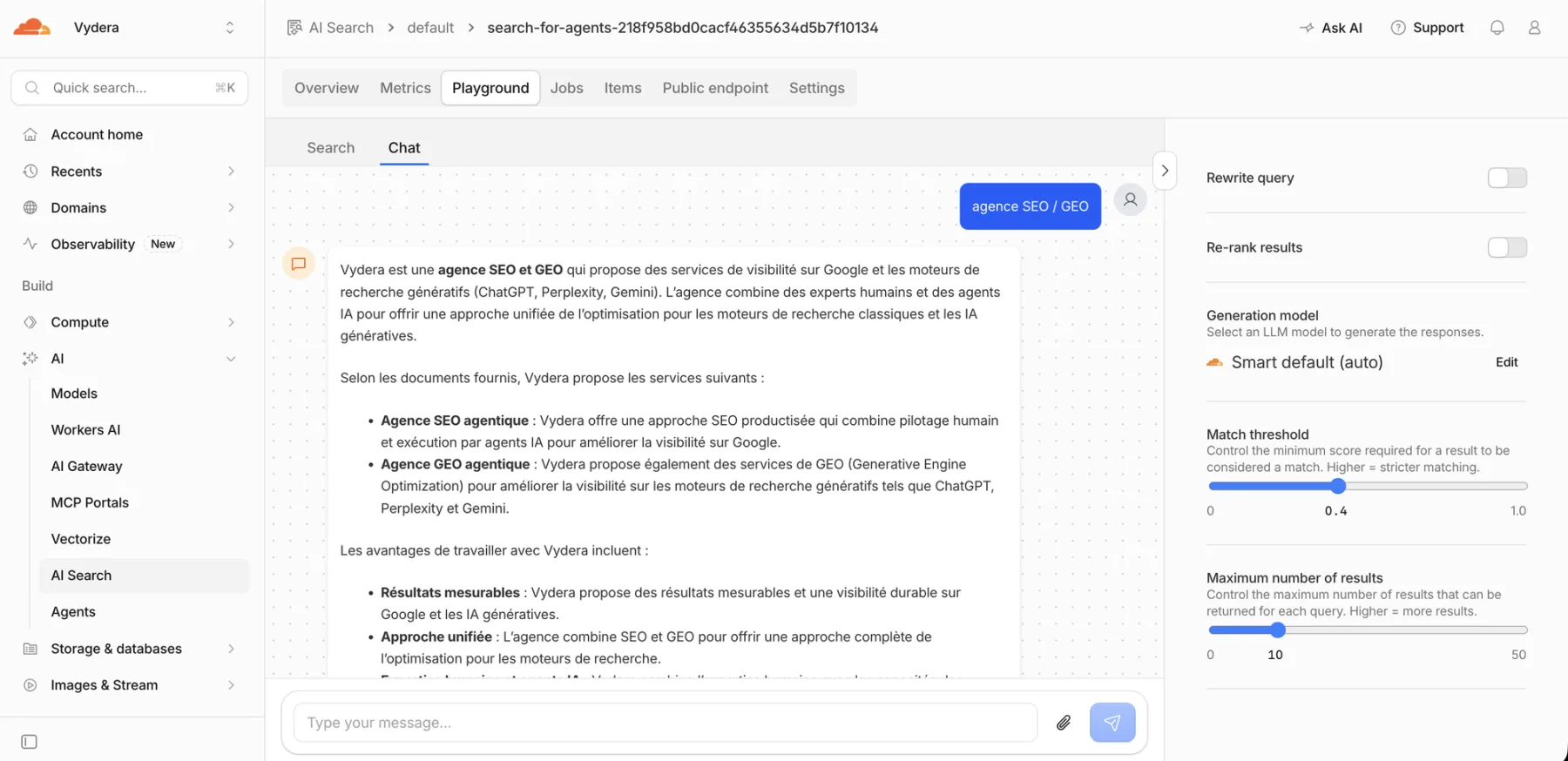
The instance's Playground tab shows what an AI would say about you with your site as its only source. The Search tab returns the same chunks as /.well-known/search. The Chat tab adds a step: a language model writes an answer from those chunks, the way an assistant would.
Asked "agence SEO / GEO", the answer describes Vydera as an SEO and GEO agency that combines experts and AI agents, then details our two offers. Nothing made up, nothing that isn't on our pages.
The call is logged in AI Gateway, which shows the exact cost. For this answer, Llama 3.3 70B (the default model) received 8,301 tokens and produced 319, in 9.8 seconds, for about $0.003. Those 8,301 tokens are the 10 chunks sent to the model: roughly what an agent reads from your site for each question.
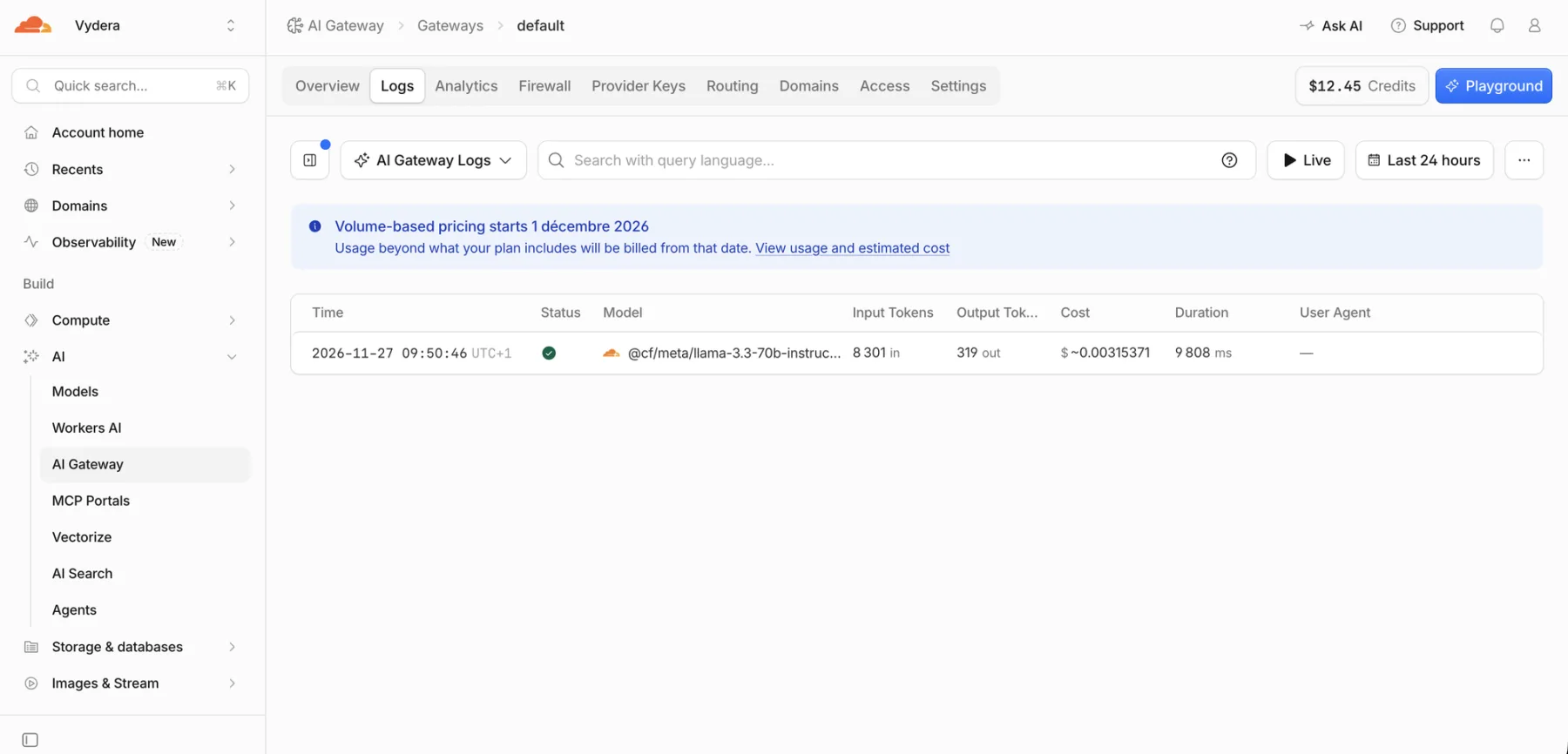
The public engine writes nothing: it returns the chunks, and the agent does the writing. Generation only happens in the Playground.
Testing your content with your prospects' questions
Your site can only answer with what's written on it. We checked with the question "how much does Vydera cost": we don't publish a price list, and the engine returned our authors page, then the legal notice. An agent asking that question leaves without an answer, or looks for it elsewhere.
So the engine doubles as a content audit. Ask it your prospects' questions, in their words:
- your prices or budget ranges;
- your timelines;
- how you differ from a named competitor;
- a client case in their industry.
Every question that returns an off-topic page points to a page you need to write. Those pages also work on Google and in ChatGPT or Perplexity answers: it's the foundation of AI visibility.
Settings to fix after activation
With the default settings, our tests surfaced five issues.
- French and English get mixed. There is no way to filter by language at query time. For "query fan-out", the 10 results alternate between the glossary page and the article, in FR and EN. Flavio Copes noticed the same thing on Cloudflare's own blog. On a bilingual site, this is the first thing to address.
- The same page comes back several times. For "llms.txt", 5 of 10 chunks come from our French guide and 3 from its English version. Result reranking, off by default, is built for this.
- Structured data is indexed as text. Several chunks contain nothing but our JSON-LD blocks (article, breadcrumb, definitions). They help search engines, but here they take the place of real passages: the top result for "query fan-out" is a chunk of pure JSON.
- The score is relative. The first result always scores 1.000, even when it's a poor match. A high score doesn't guarantee a good answer: you have to read the results.
- Markdown discovery depends on your setup. With Markdown for Agents (Cloudflare's other feature, Pro plan and up), Cloudflare also adds the engine to the top of each page's Markdown version. If you serve your Markdown yourself, as vydera.com does on the Free plan, add that block in your own code.
The instance's Settings tab handles the rest: path exclusions, number of results, relevance threshold, query rewriting, page boosting, sync frequency.
Search for Agents pricing
According to the AI Search pricing page, billed from December 1, 2026:
For vydera.com, 1,853 chunks of at most 1,024 tokens come to under 2 million tokens: indexing fits within the included allowance. On the Workers Free plan, crawling is capped at 500 pages a day, so a 5,000-page site takes about ten days to index. Since the engine is public, a WAF rate-limiting rule keeps you from paying for an abusive bot.
Do ChatGPT, Gemini and Perplexity use this engine?
At launch, none of the major assistants had announced reading these tags or calling /.well-known/search. Cloudflare mentions one early agent that found the engine on its own, OpenCode, a coding assistant. On vydera.com, the first six hours only saw our own tests.
Sites that served Markdown, an llms.txt or clean structured data early were ready when AI systems started reading them. The engine is set up and tested now, before the traffic arrives. WebMCP, which lets a site describe the actions an agent can take on it, points the same way. For GEO and AEO, it's the next layer after being readable: being queryable.
To track agents as they arrive, filter Cloudflare analytics on the /.well-known/search path, by user agent. One detail: requests sent with the QUERY method show up with an "UNKNOWN" method. Count these calls separately from your AI-referred visits in GA4, since an agent doesn't trigger your analytics tag.
Turn on Search for Agents in 6 steps
- Turn on Search for Agents on your Cloudflare zone page, under Quick Actions, and wait for the first indexing to finish.
- Exclude useless paths in the Settings tab: thank-you pages, archives, categories, previews, API.
- Test in the Playground with your prospects' questions: the Search tab shows what an agent will receive, the Chat tab what it would say.
- Write the missing pages: every question without a good answer is a content topic.
- Adjust language, duplicates and reranking if your site is multilingual.
- Rate-limit and measure calls: a WAF rule on
/.well-known/search, and tracking by user agent in Cloudflare analytics.
How much does Search for Agents cost?
It's open to every plan, including Free. Usage follows AI Search pricing, billed from December 1, 2026: 1,000 semantic searches, 1,000 full-text searches, 5 million indexing tokens and 10 GB-month of storage are included each month, and the rest is billed by usage.
Does my site need to be hosted on Cloudflare?
Your domain needs to run through Cloudflare (DNS and proxy), whatever your host or CMS. The toggle is on the zone page, under Quick Actions.
Does it improve visibility in ChatGPT or Perplexity?
Not directly today: no major assistant has announced using this engine yet. The content test it enables pays off right away, though, since the pages that answer your prospects' questions are also the ones ChatGPT and Perplexity cite.
How is it different from llms.txt?
llms.txt is a static file that introduces the site and lists its key pages. Search for Agents is a search engine: the agent asks a question and gets back the passages from your pages that answer it. The two complement each other.
Where do I configure the engine once it's on?
In the AI Search section of your Cloudflare account, or from the zone page. The instance is named search-for-agents- followed by the zone ID. The Playground, Jobs, Items and Settings tabs let you test, track indexing and set exclusions, number of results and sync.